The instructions provided in this section were verified against Mozilla Thunderbird 31.4.0. They might not work with earlier or later versions of Mozilla Thunderbird.
To set up Mozilla Thunderbird:
- Open Mozilla Thunderbird.
- Click Email under the Create a new account heading.
- Click the Skip this and use my existing email button.
- Specify the following:
- Your name, as you want it to appear in any messages you send.
- Your email address and password.
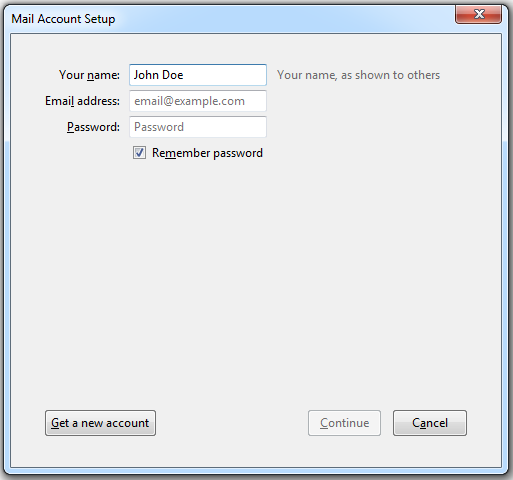
- Click Continue.
- If Thunderbird fails to find the settings automatically, specify the following:
- Account type. If you want to keep copies of messages on the server, select the IMAP option. If you do not want to keep any messages on the server, select the POP3 option. Selecting IMAP will also allow you to train the SpamAssassin spam filter on email messages you receive, if SpamAssassin is enabled on the server.
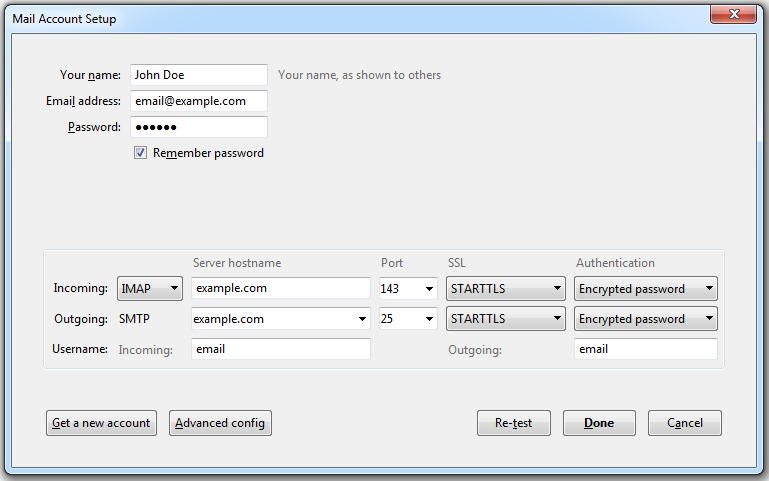
- Account type. If you want to keep copies of messages on the server, select the IMAP option. If you do not want to keep any messages on the server, select the POP3 option. Selecting IMAP will also allow you to train the SpamAssassin spam filter on email messages you receive, if SpamAssassin is enabled on the server.
- Click Done.
If you set up a mail account manually, please use the following typical combinations of connection security and authentication method settings. If the settings do not work for you, ask your hosting provider about the correct combination.
On Linux, SMTP, IMAP, POP3:
- SSL: STARTTLS
- Authentication: Encrypted password
On Windows, IMAP:
- SSL: None
- Authentication: Encrypted password
On Windows, SMTP, POP3:
- SSL: None
- Authentication: Normal password
Other parameters that you may need when configuring your account manually:
- POP3 port: 110
- IMAP port: 143
- SMTP port: 25
- Username. Your full email address. For example: johndoe@example.com.
- Incoming server address (POP3/IMAP). Specify your website's Internet address. Example: example.com
- Outgoing server address. Specify your website's Internet address. Example: example.com
Was this answer helpful?
Also Read
-
Email Sending through Code in Asp.net Open or Close
Included Namespace.using System.Net; using System.Net.Mail; After adding Namespace use below... Read More
-
How to configure mail in Mac OS Open or Close
The instructions provided in this section were verified against Apple Mail 8.2. They might not... Read More
-
How to Configure Mail in iPhone Open or Close
The instructions provided in this section were verified against iPhone 5s. To set up a mail... Read More
-
Access from Microsoft Office Outlook 2010 Open or Close
To set up Microsoft Office Outlook 2010: Open Microsoft Office Outlook 2010. Go to File >... Read More
-
Access from Webmail Open or Close
To access your mailbox through webmail, do any of the following: In a Web browser, visit the... Read More



