-
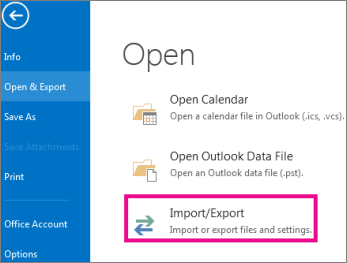
Select File > Open & Export > Import/Export.
-
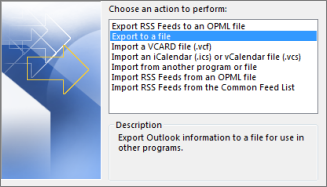
Select Export to a file, and then select Next.
-
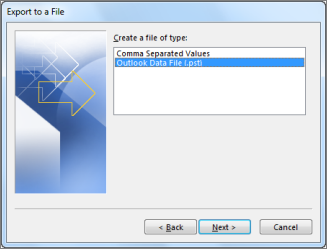
Select Outlook Data File (.pst), and select Next.
-
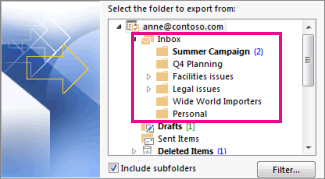
Select the mail folder you want to back up and select Next.
-
Choose a location and name for your backup file, and then select Finish.

-
Enter and confirm a password, and then select OK.
The messages that you keep in a .pst file are no different from other messages. You can forward, reply, or search through the stored messages as you do with other messages.
Was this answer helpful?
Also Read
-
Adding Blogger Site to your Domain Open or Close
1. To begin with, you need to set up your domain in your Blogger account. Once logged in,... Read More
-
Remote MS SQL Connection Through Local SQL Server Managment Open or Close
Open MS SQL server Management on your local System.In Server Type Select "DataBase Engine"In... Read More
-
IP Block Open or Close
Ip is blocked Whenever there is login failure for 3 Times in row in cPAnel or WHM or Email. After... Read More
-
Restore your email on Outlook Open or Close
Follow these steps to restore, or import, your data into Outlook: Click the File tab. In the... Read More
-
Creating Private Name Servers Open or Close
Creating Your Own Name Servers Step1.Log into client area . Step2. Click on DOMAINS... Read More



